
- Developers
- Professional Navigation for Fleets
- Licensing
- First activation of B2B Licenses
First activation of B2B Licenses
Activation of B2B Licenses
Overview
To activate a B2B license for Sygic Professional Navigation, you first need to install the application and retrieve its unique Device ID. This identifier is used to assign and activate the corresponding license.
Step 1: Download and Install the Application
The recommended option is to install the Enterprise APK, which can be provided by your dedicated Customer Project Manager at Sygic with customized settings based on your requirements (not available for iOS users).
Alternatively, you can download Sygic Truck & Caravan from the official Google Play Store (Android) or App Store (iOS).
Important: When using the store version, the initial screen offers two options: I already have a license and Try for free. Please select I already have a license and avoid clicking Try for free, as this activates a B2C trial license rather than the intended B2B licensing process.
Step 2: Find Your Device ID
Once the application is installed, the Device ID is displayed on the initial screen.
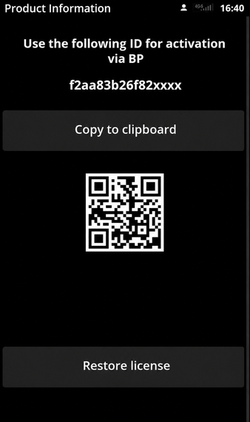
Alternatively, you can find it in the application settings:
Settings → Info → About → Device ID
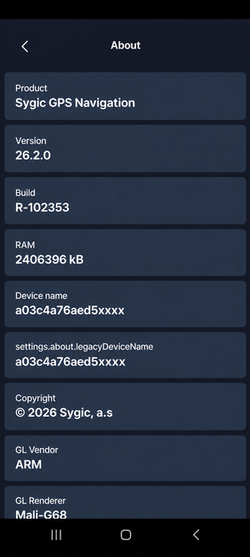
Each physical device has its own unique Device ID.
By default, the Device ID is software-generated. However, if your devices are managed through a Mobile Device Management (MDM) platform, hardware identifiers such as the device's serial number or IMEI can be used instead.
For more information, refer to the Activation with Hardware Identifiers via MDM guide.
Step 3: Activate Your B2B License
The recommended method is to activate your licenses directly through Sygic Business Portal, our license management platform.
- Log in to Business Portal using your access credentials.
- Activate the licenses by assigning them to the corresponding Device IDs.
For detailed instructions, refer to the BP User Guide.
Alternatively, you can send the collected Device IDs to your dedicated Customer Project Manager at Sygic, who can assist with license activation.